
STUDIO GUIDE
How to get more Google reviews for your photography business
To get more Google reviews, copy your review link from your Google Business Profile, then ask every client, not just the happy ones, at the moment they’re most pleased, usually when they receive their gallery or prints. Send the link by text or email with one short, personal line, follow up once, and reply to every review. Don’t offer anything in exchange for a review, and don’t ask only the clients you expect to be positive.
By the Allio team. Updated 22 October 2026.

1. Set up and verify your Google Business Profile
Reviews sit on your Business Profile, which shows in Google Search and Maps. Claim and verify it, choose an accurate category, and fill in your services, hours, service area and photos of your work. If you work from home and visit clients, show a service area rather than your home address.
2. Get your Google review link
Google gives you a link and a QR code that open your review form directly:
- On a computer, sign in with the Google account that manages your Business Profile and open your profile.
- Select Read reviews, then Get more reviews.
- Select Copy to copy the link, or right-click the QR code and save it.
Google says the QR code can only be created in a computer browser. Test the link on your phone before you send it. Clients need a Google Account to leave a review, and it can use any email address.
3. Ask at the right moment
For portrait studios, the best moment is usually when the client sees the finished work: when the gallery is delivered, after the viewing, or when prints and wall art are collected. That’s when they’re most pleased and the experience is fresh.
Ask every client, the same way, every time. A habit tied to delivery works far better than remembering to ask when you have a spare minute.
4. What to send
Keep it short, personal and easy. One line of thanks, one line asking, and the link. For example:
Text: “Hi Sarah, thank you for choosing us for Mia’s first birthday photos! If you have a minute, we’d love an honest Google review: [link]. Ellie, Fernhill Portrait Studio”
Email subject: “Your gallery, and a small favour”
Email body: “Hi Sarah, we hope you love your gallery. If you have a minute, would you leave us an honest review on Google? It helps other families find us. [Review link]. Thank you, Ellie”
Follow up, once, a few days later: “Hi Sarah, just a gentle reminder in case it got buried. Here’s the link if you’d like to leave a review: [link]. No worries if not!”
Send it from your studio’s name and number, not a no-reply address. Follow up once, then stop.
Asking in person, the right way
A viewing or collection appointment is a natural moment to mention reviews, but Google doesn’t want businesses pressuring clients to review while they’re still with you. So mention it, then let them do it later:
- Say something like “If you’re happy with everything, we’ll send you a link to leave a review. It really helps other families find us.”
- Hand over a small card with your QR code to take home with their prints.
- Don’t hand them a tablet, wait while they type, or ask them to mention a particular photographer.
Then send the link by text or email the same day, while it’s fresh.
5. Follow the rules
Google’s policies and consumer law are clear on the basics. Google doesn’t allow businesses to:
- Offer incentives, such as discounts, products or prize draws, in exchange for a review, or for changing or removing a negative review
- Discourage negative reviews or ask only the clients you expect to leave positive ones
- Pressure clients to leave a review while they’re on your premises, or ask for specific content, such as naming a photographer
- Post reviews about your own business, or have staff or anyone with a conflict of interest do it
In the US, the FTC’s rule on consumer reviews bans fake reviews and incentives tied to a positive or negative review. In Australia, the ACCC says any incentive must apply whatever the review says and be clearly disclosed, and the Federal Court penalised a business that kept review requests from guests it expected to be unhappy. The simplest way to stay on the right side of all of them: ask everyone, offer nothing, and let clients say what they really think. This is general information, not legal advice. Rules change and vary by country and state, so check your local rules or ask a lawyer if you’re unsure.
That rules out “review gating”, where you ask how the session went and only send the Google link to clients who say they’re happy.
6. Automate the ask
A review request that sends itself never gets forgotten in a busy week. Tie it to a step that happens for every client, such as the gallery being delivered or an order being collected, and send the same message to everyone.
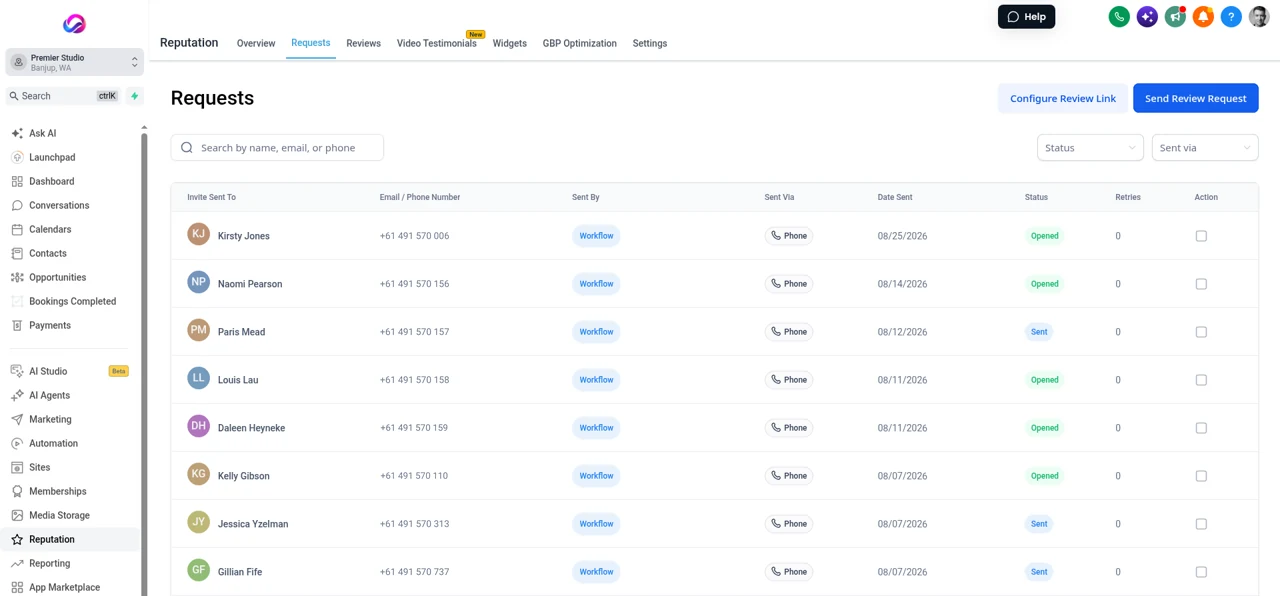
Where Allio fits: Allio can send review requests by text through a workflow when a gallery is delivered or an order collected, and you can see who was sent one and who opened it. See features.
7. Reply to every review
Replies are public, and future clients read them. Google suggests keeping replies short, specific and personal rather than the same thank you every time, and not using them to advertise offers.
- Positive reviews: thank them by name and mention something real from the session. Don’t share private details, such as a child’s full name or where the family lives.
- Negative reviews: reply calmly and promptly, acknowledge the problem, apologise where it’s fair, explain what you can do, and offer to talk by phone or email. Never argue, and never share the client’s private information.
- Reviews that break Google’s policies, such as fake or abusive ones, can be reported to Google.
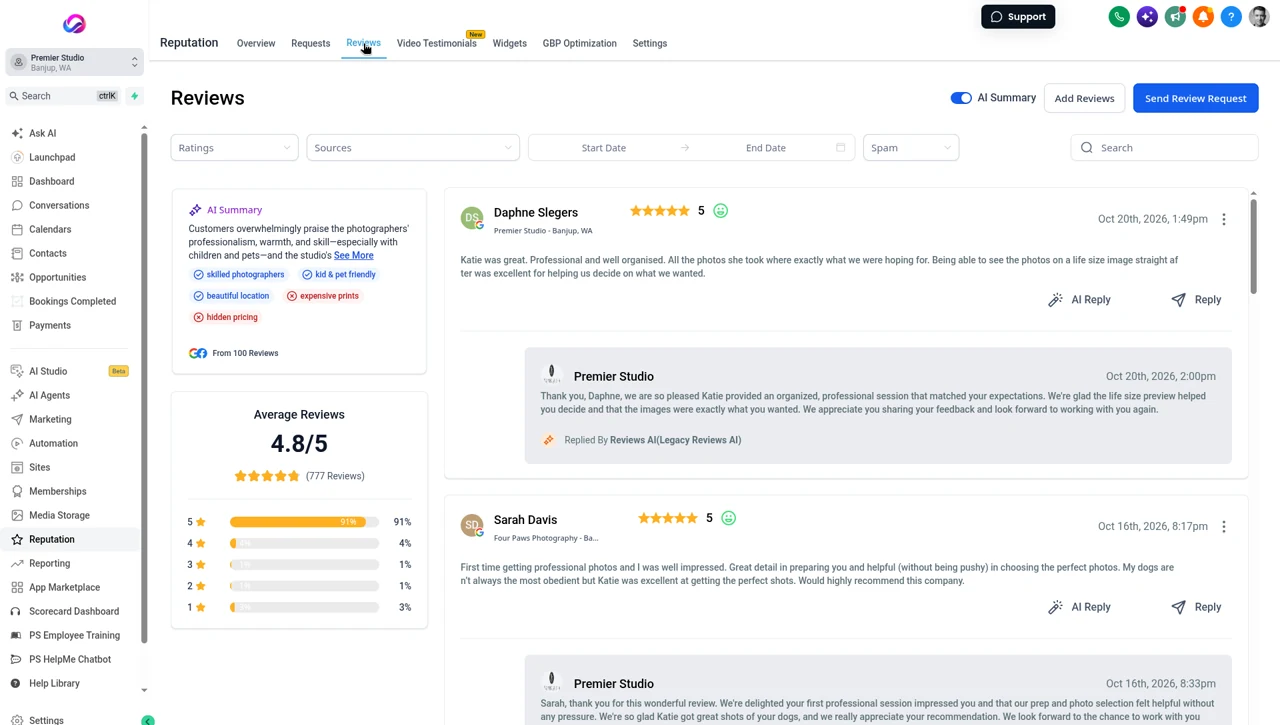
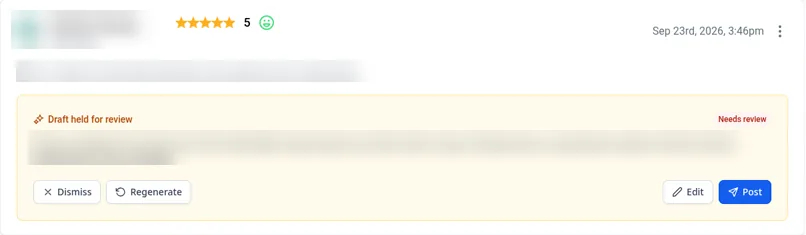
Where Allio fits: Allio’s AI review replies draft a reply to each Google and Facebook review in your studio’s voice, automatically or as a suggestion you approve.
8. Use your reviews
Share a review on social media with the client’s permission, quote reviews on your website with their first name, and mention them in your mini session posts. Look for patterns too: if several reviews mention how calm you were with their toddler, say that on your website.
Google review questions
How do I get my Google review link?
On a computer, open your Google Business Profile, select Read reviews, then Get more reviews, and select Copy. You can also save the QR code there.
When should a photographer ask for a review?
When the client sees the finished work: gallery delivery, the viewing, or collecting prints. Ask every client at the same point.
Can I offer a discount for a Google review?
No. Google doesn’t allow incentives in exchange for reviews, and US and Australian consumer rules restrict incentives tied to what a review says. Ask, and offer nothing.
Can I ask only my happiest clients?
No. Google doesn’t allow businesses to selectively ask for positive reviews, and in Australia the Federal Court penalised a business for keeping review requests from unhappy guests. Ask every client.
Should I reply to every Google review?
Yes, briefly and personally. Replies show future clients how you treat people, especially when a review is negative.
How many times should I ask?
Once, with one gentle follow up a few days later. After that, leave it.
Sources
- Google Business Profile Help, create a Google link or QR code to request reviews: support.google.com/business/answer/16816815?hl=en
- Google Business Profile Help, tips to get more reviews: support.google.com/business/answer/3474122?hl=en
- Google Maps user contributed content policy, fake and misleading content, rating manipulation: support.google.com/contributionpolicy/answer/7400114?hl=en
- US Federal Trade Commission, consumer reviews and testimonials rule (16 CFR Part 465, effective 21 October 2024): ecfr.gov/current/title-16/chapter-I/subchapter-D/part-465
- FTC, consumer reviews and testimonials rule: questions and answers: ftc.gov/business-guidance/resources/consumer-reviews-testimonials-rule-questions-answers
- ACCC, online reviews for products and services: accc.gov.au/business/advertising-and-promotions/online-reviews-for-product-and-services
- ACCC, Meriton to pay $3 million for misleading consumers on TripAdvisor (31 July 2018): accc.gov.au/media-release/meriton-to-pay-3-million-for-misleading-consumers-on-tripadvisor
Checked 22 October 2026.
Ask every client, and answer every review.
The trial is seven days, card required, and you can be in within minutes.
Want the story first? Read who built Allio and why, or see what a call about Allio covers.
$297 per month. Card required. AI and phone usage is billed at cost, on top of the $297.