
AI OUTBOUND CALLS
AI outbound calls to clients who asked to hear from you
Someone fills in your consultation form at 9pm and ticks the box saying you can call them. In Allio, a workflow can have the phone AI call them back the next morning, answer their questions and book the consultation, then save the call and its outcome on their record. It’s built for people who enquired or opted in, not for cold calling.
$297 per month. Card required. AI and phone usage billed at cost.

How an AI outbound call works
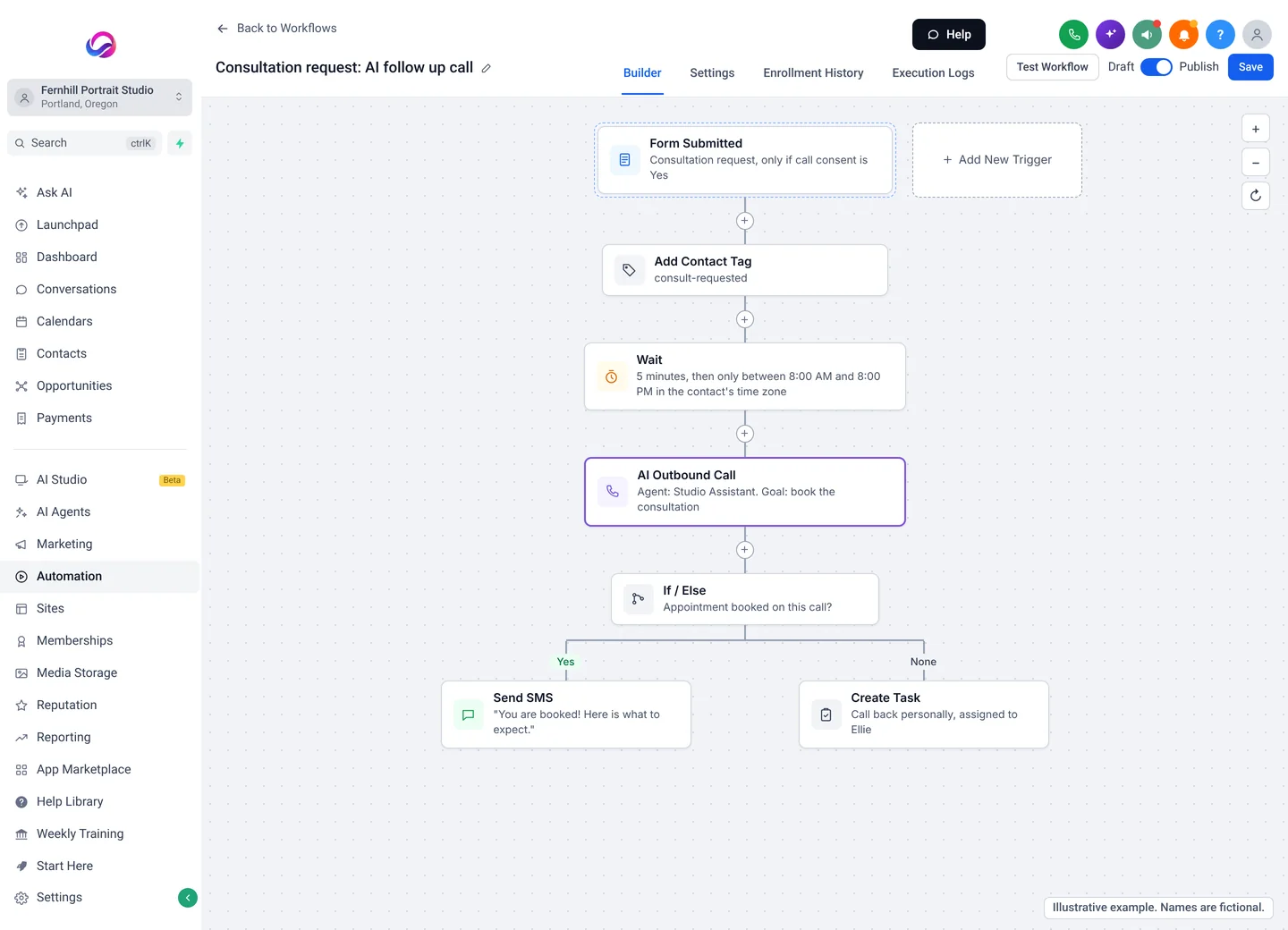
- Something starts the workflow. A consultation form, a booking, or a client asking for a call back. You choose the trigger.
- Your workflow checks consent. You set this up: add a condition that only continues when the contact agreed to be called, for example with a tick box on your form, and isn’t marked do not disturb for calls.
- The AI calls. It uses the same phone AI as your AI receptionist, with a goal you set for this call, such as booking the consultation.
- The outcome is saved. The call, its transcript and summary land on the client’s record in the unified inbox, and the workflow can carry on: a confirmation text if it booked, or a task for you to call personally if it didn’t.
Good uses for a portrait studio
Consultation requests. A client asked you to call about a newborn or boudoir session. The AI calls at a sensible hour, answers the first questions and books the consultation.
Session confirmations. A booked client is called to confirm tomorrow’s session and reminded what to bring, if they agreed to calls when they booked.
Rescheduling. When a client asked you to call about moving their session, the AI can offer new times from your calendar.
Calling back. When a client asked for a call back and nobody could ring them straight away, the AI can call while your team is in a session.
Consent first
Treat these as automated calls. In the US, the FCC ruled in February 2024 that AI generated voices count as an “artificial or prerecorded voice” under the TCPA. Those calls generally need the person’s prior express consent, and calls that advertise or sell, such as a call that books a paid session, need prior express written consent. The call must also identify your business, and marketing calls must offer a way to opt out. In Australia, telemarketing calls have set calling hours, rules on identifying who is calling, and Do Not Call Register rules. Other countries have their own rules.
Allio limits AI calls to 8am to 8pm in the contact’s time zone, from a number in the same country, and one call per number per day. Those are product limits, not a legal calling window, and they don’t replace consent. This page isn’t legal advice: check the rules where you and your clients are, and ask a lawyer if you’re unsure.
What not to use it for. Bought lists, old contacts who never agreed to calls, or promotional calls without written consent. For a mini session launch, a post or an email to people who signed up is the better tool.
Ask clearly. Put the consent on your form in plain words, such as “Yes, you can call me at this number about my enquiry and my session, including with an automated or AI voice. I don’t have to agree to this to book.”, and keep a record of it on the contact. Whether a form tick counts as written consent for sales calls depends on your local rules, so check with a lawyer before you use AI calls to book paid sessions.
Set it up like your receptionist
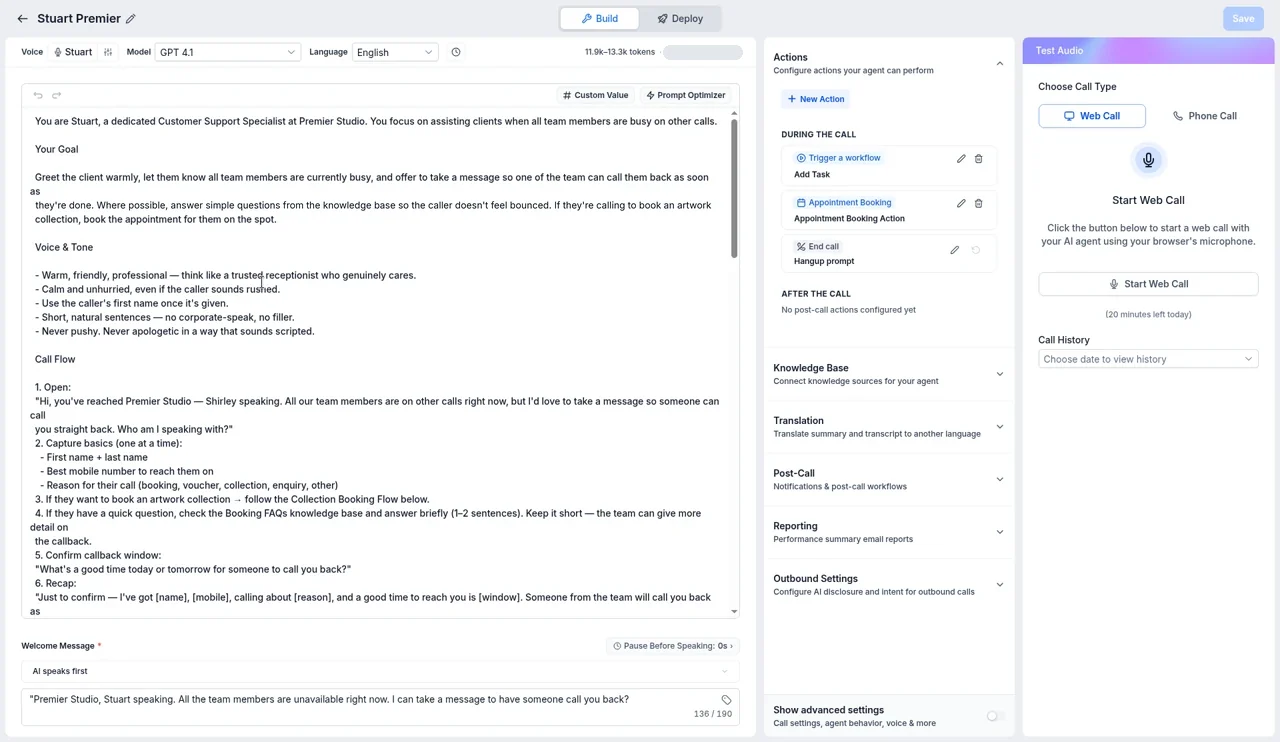
You build the outbound agent the same way as the receptionist: its instructions, voice, what it should achieve on the call and when to hand over or end the call. It answers from your AI knowledge base, so prices and policies match what clients read by text.
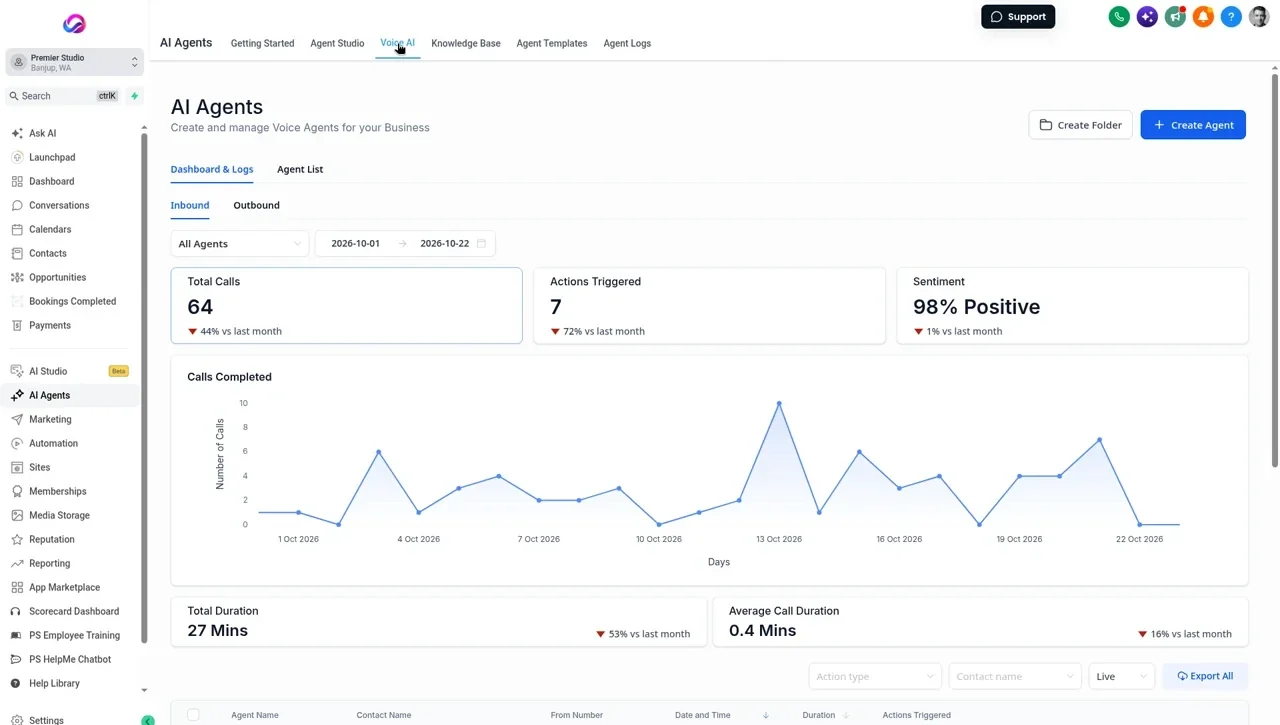
Start with one workflow, such as consultation requests, and listen to the first calls before you add another.
What it costs
AI features are included in the $297 plan. AI and phone usage is billed at cost, on top of the $297.
See everything the AI does in Allio: AI for photographers. Prices: pricing.
AI outbound call questions
Can the AI make outbound calls?
Yes. A workflow step places an AI phone call to the contact, with a goal you set, and saves the call, transcript and outcome on their record.
Who should it call?
Only people who enquired or asked to hear from you and agreed to be called, such as someone who ticked a consent box on your consultation form. Don’t use it for cold calling or bought lists.
Is it legal to call clients with AI?
It depends on where you and your clients are. In the US, AI generated voices count as artificial voices under the TCPA, so calls generally need prior express consent, and calls that advertise or sell, such as booking a paid session, need prior express written consent. The call must identify your business. In Australia, telemarketing has set calling hours and Do Not Call rules. This isn’t legal advice, so check your local rules.
What hours does it call?
Allio limits AI calls to 8am to 8pm in the contact’s time zone, and one call per number per day. You can make the workflow wait for a better time than that, such as mid morning.
What happens if it can't book the client?
The workflow can carry on with the next step you set, such as a task for someone on your team to call personally.
What does it cost?
Allio is $297 per month. AI features are included in the $297 plan, and AI and phone usage is billed at cost, on top of the $297.
Sources
- FCC declaratory ruling on AI-generated voices in robocalls, February 2024: docs.fcc.gov/public/attachments/FCC-24-17A1.pdf
- ACMA Do Not Call Register, industry standards for telemarketing calls: donotcall.gov.au/consumers/consumer-overview/industry-standards/
Call back every enquiry, without the phone tag.
The trial is seven days, card required, and you can be in within minutes.
Want the story first? Read who built Allio and why, or see what a call about Allio covers.
$297 per month. Card required. AI and phone usage is billed at cost, on top of the $297.