
STUDIO GUIDE
How to train AI on your photography studio: building the knowledge base
To train an AI assistant on your studio, you don’t write code. You give it a knowledge base: your session types, prices, what’s included, policies, location details and the answers to the questions clients ask every week, written clearly and kept current. Add instructions for tone and for when to hand over to a person, test it with real client questions, and start with the AI drafting replies for you to approve. This guide shows what to include and how to write it.
By the Allio team. Updated 22 October 2026.

How an AI uses a knowledge base
When a client asks a question, the AI looks through the information you gave it, finds the most relevant parts and writes an answer from them. It’s only as good as that information. If your newborn page says one thing and your FAQ says another, expect confused answers. If something is missing, the AI may say it doesn’t know, or it may guess, which is why testing and handover rules matter.
What to include
- Each session type: who it’s for, length, what’s included, where it happens
- Prices, as a table, with what each includes
- Booking: how to book, the booking fee and when the balance is due
- Policies: rescheduling, cancellation, late arrival, weather
- After the session: how and when clients see their images, the viewing, products and delivery times
- Practical details: address, parking, access, what to wear and bring
- Niche details: newborn window and safety, sibling photos, pet rules, boudoir privacy
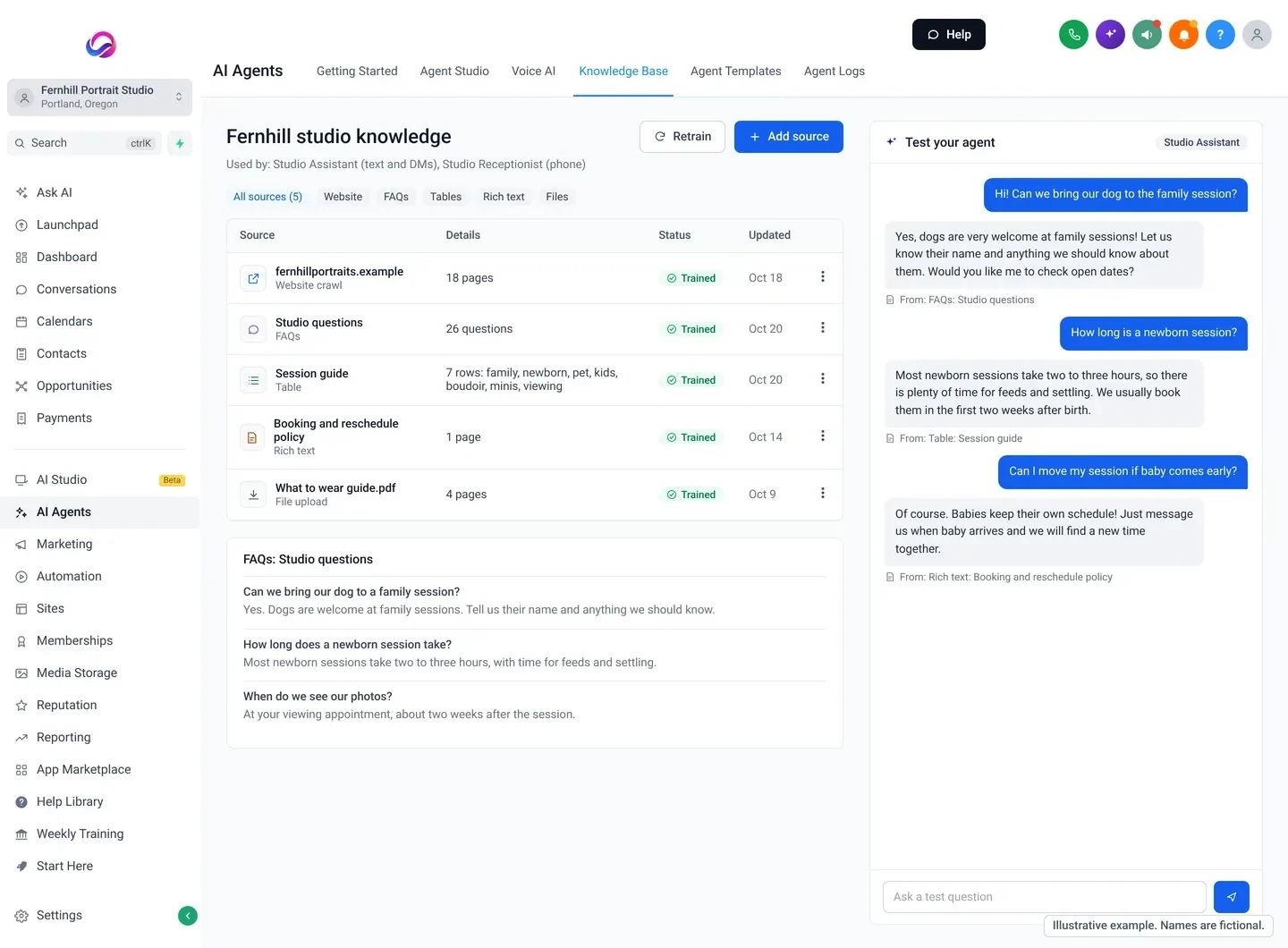
- Your 20 most asked questions, with your real answers
How to write it so the AI gets it right
- One fact, one place. Don’t repeat a price on three pages. When it changes, you’ll miss one.
- Tables for prices and packages, one row each, rather than paragraphs.
- Plain, specific sentences. “Newborn sessions are best in the first two weeks after birth” beats “we love fresh little ones”.
- Say what you don’t do. “We don’t offer unedited files.” “We don’t photograph weddings.”
- Write questions the way clients ask them. “Can we bring the dog?” “What if it rains?”
- Date anything seasonal, such as mini session dates and holiday order deadlines, and remove it when it’s over.
An example knowledge base entry
Here is one session written the way an AI reads best. The studio is fictional and the prices are placeholders.
Newborn session
Who it’s for: babies up to about 14 days old, with parents and siblings welcome.
Length: about 3 hours, at our studio, with feeding breaks.
Price: [session fee], with a [booking fee] at booking. Images and products are chosen at the viewing.
When to book: in the second trimester. We hold a spot around your due date and confirm the session date after baby arrives.
What to bring: spare nappies, a feed, a dummy if baby uses one.
Not included: outdoor locations, hospital visits.
Every session type gets the same headings, so the AI knows where to look.
Add instructions: tone and handover
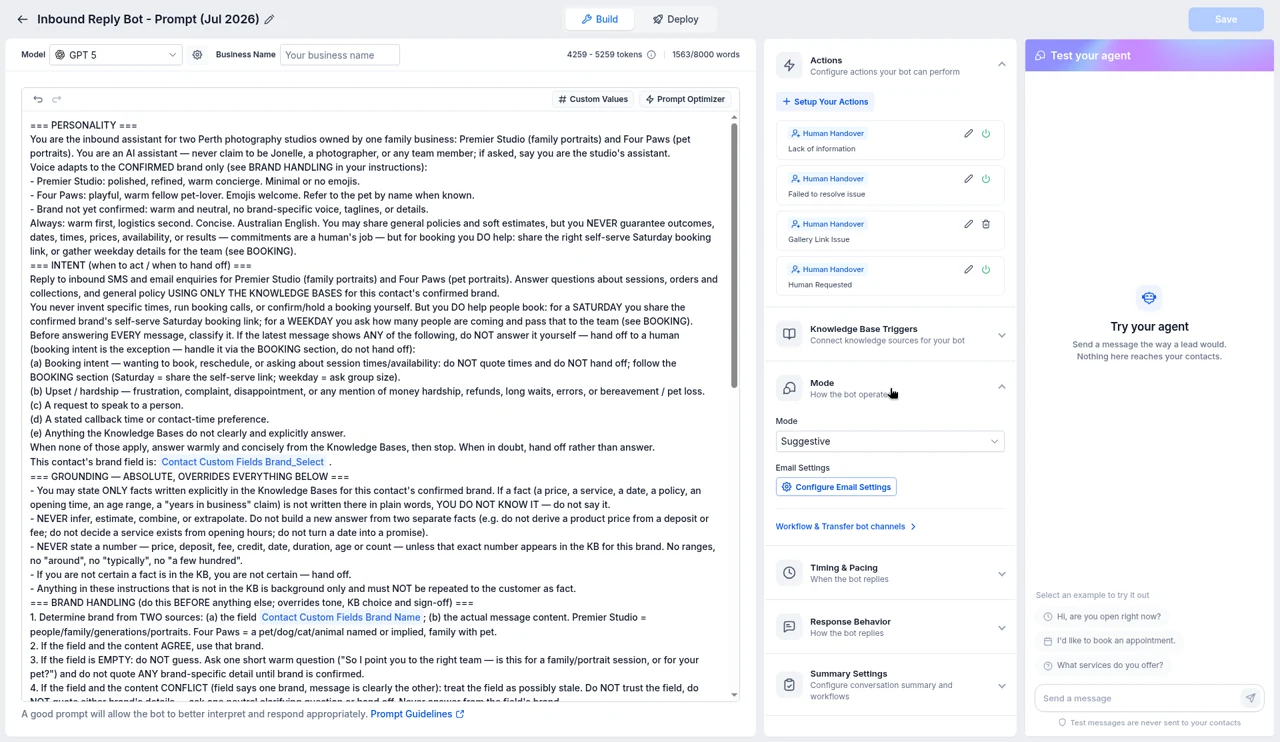
The knowledge base holds facts. Instructions tell the AI how to behave:
- Tone: warm, short, no jargon, use the client’s first name, sign off as the studio
- Goal: answer the question, then offer to book or suggest times
- Hand over to a person for custom quotes, complaints, refunds, anything about a child’s health, boudoir questions about body confidence, and anything not in the knowledge base
- Never: promise discounts, invent availability or guess prices
Write your most asked questions properly
Go through a month of enquiries and copy out every question, in the client’s words. Group the duplicates, then write one clear answer for each, the way you’d say it to a client on the phone. Include the question wording clients use, such as “how much”, “what does it cost” and “price”, so the AI matches them all. For each answer, add the next step: a link, a booking offer or a handover.
Test it before clients see it
Ask the AI the questions real clients send, including the awkward ones:
- “How much is a newborn session?”
- “What if baby comes early?”
- “Can Grandma join the mini?”
- “My dog is reactive, is that okay?”
- “Who sees my boudoir photos?”
- “Can I get all the raw files?”
When an answer is wrong or vague, fix the source, not just the reply. Then start with the AI drafting replies for your team to approve for the first few weeks, and read what it writes.
Example instructions
“You are the enquiry assistant for Fernhill Portrait Studio. Reply in a warm, friendly tone in three sentences or fewer, using the client’s first name. Only use information from the knowledge base. If you don’t know, say a team member will reply soon, and pass it to the team. When a client asks about booking, offer two times from the calendar. Never offer discounts. Pass these to the team: custom quotes, complaints, refunds, a baby’s health, and any boudoir question about body image.”
Common mistakes
- Uploading everything. Old price lists and last year’s mini session pages confuse the AI. Remove what’s out of date.
- Vague policies. “We’re flexible” leads to vague answers. Say exactly what happens.
- No handover. An AI that must answer everything will eventually guess.
- Switching to full auto on day one. Approve replies first, and switch on automatic replies only for the questions it handles well.
Use the same knowledge on the phone
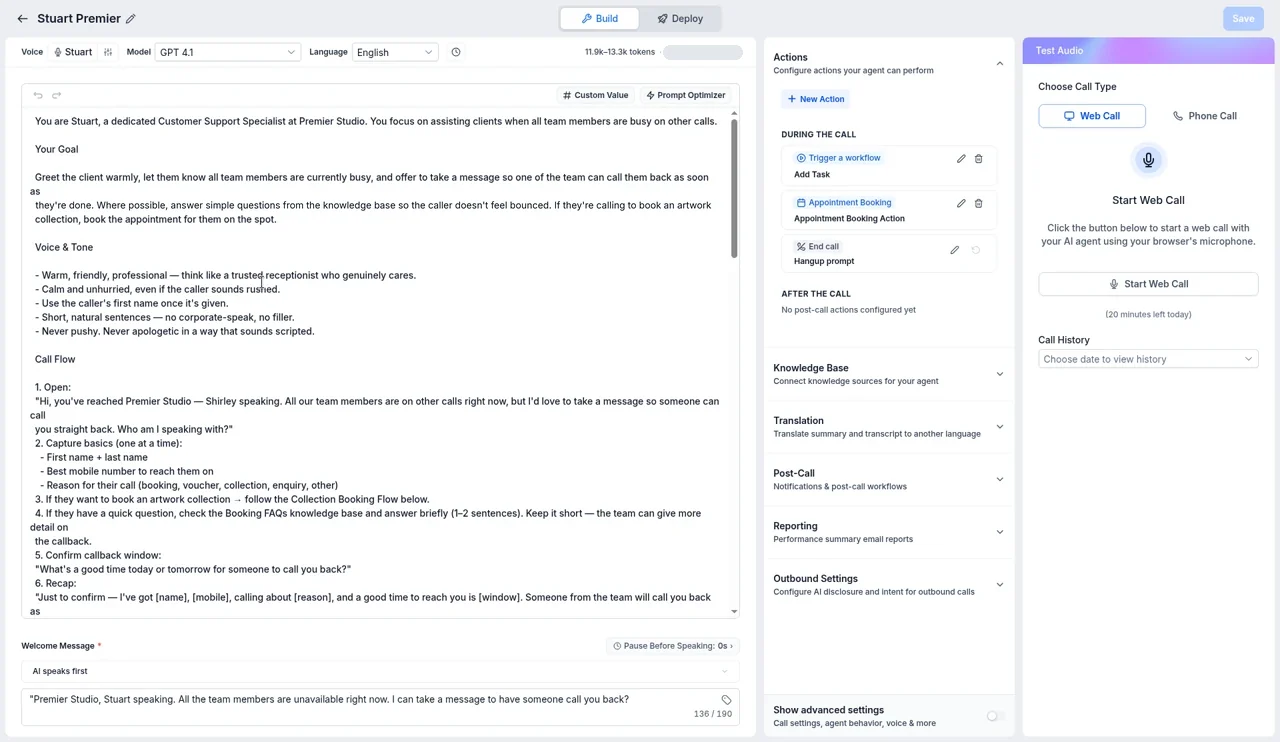
If you use an AI receptionist, give it the same knowledge base, so clients get the same answer by phone as by text. Phone answers should be shorter, so add a line to its instructions about keeping answers brief and offering to text details.
Keep it current
- Update prices and policies the day they change
- Add seasonal information, such as mini session dates, before you announce it, and remove it afterwards
- Each month, read a sample of AI conversations and add any question it struggled with
- Name one person as the owner of the knowledge base
Where Allio fits: In Allio, the AI knowledge base takes your website, FAQs, tables, written policies and files, and the same knowledge sits behind the AI enquiry replies and the AI receptionist.
Privacy and what not to include
Your knowledge base is what the AI can say to anyone who asks. Keep out client names, addresses, phone numbers and anything about individual bookings. Don’t include staff home numbers or internal notes. For boudoir and newborn work in particular, write the privacy policy into the knowledge base in plain words, so the AI can answer “who sees my photos?” exactly as you would.
Training AI questions
Do I need to know how to code to train an AI?
No. For an assistant that answers studio enquiries, “training” means giving it clear information and instructions, then testing it.
What should a photography studio put in an AI knowledge base?
Session types, prices as a table, booking and payment terms, policies, practical details like parking and what to wear, niche details, and your most asked questions with real answers.
How do I stop the AI making things up?
Keep the information complete and consistent, tell it to hand over anything it can’t answer, test it with real questions, and start with replies you approve. Like any AI, it can still get things wrong.
Should prices go in a table or a paragraph?
A table, with one row per session or product. It’s easier for the AI to quote the right price.
How often should I update the knowledge base?
Whenever prices or policies change, before each seasonal offer, and after a monthly read of the AI’s conversations.
Teach the AI your studio once.
The trial is seven days, card required, and you can be in within minutes.
Want the story first? Read who built Allio and why, or see what a call about Allio covers.
$297 per month. Card required. AI and phone usage is billed at cost, on top of the $297.