
STUDIO GUIDE
Is AI safe for client conversations? A checklist for portrait studios
AI can be safe for client conversations if you keep control of it. That means starting in a mode where you approve every reply, giving it your own answers to work from, setting clear rules for when it hands over to a person, never letting it take card details or give advice it isn’t qualified to give, and reading what it says. The risks are real but manageable: wrong answers, a tone that isn’t yours, privacy slips and consent rules for calls and texts. This guide covers each one, and ends with a checklist to run before you switch anything on.
By the Allio team. Updated 22 October 2026.

The real risks, in plain words
Wrong answers. AI can sound confident and still be wrong. It might quote an old price, promise a date you can’t do, or invent a policy. This is the biggest risk, and the main reason to start with approval on.
Tone. A reply can be correct and still sound unlike you: too formal, too chirpy, or too pushy for a nervous boudoir client.
Privacy. Clients share personal details: a due date, a family situation, a body confidence worry. Those need the same care whether a person or an AI reads them.
Consent rules. Calls and texts come with rules about consent, recording and marketing, and they differ by country and state.
Over-reliance. If nobody reads the conversations, small mistakes repeat for weeks.
None of these is a reason to avoid AI altogether. Each one has a practical control.
Control 1: start in approval mode
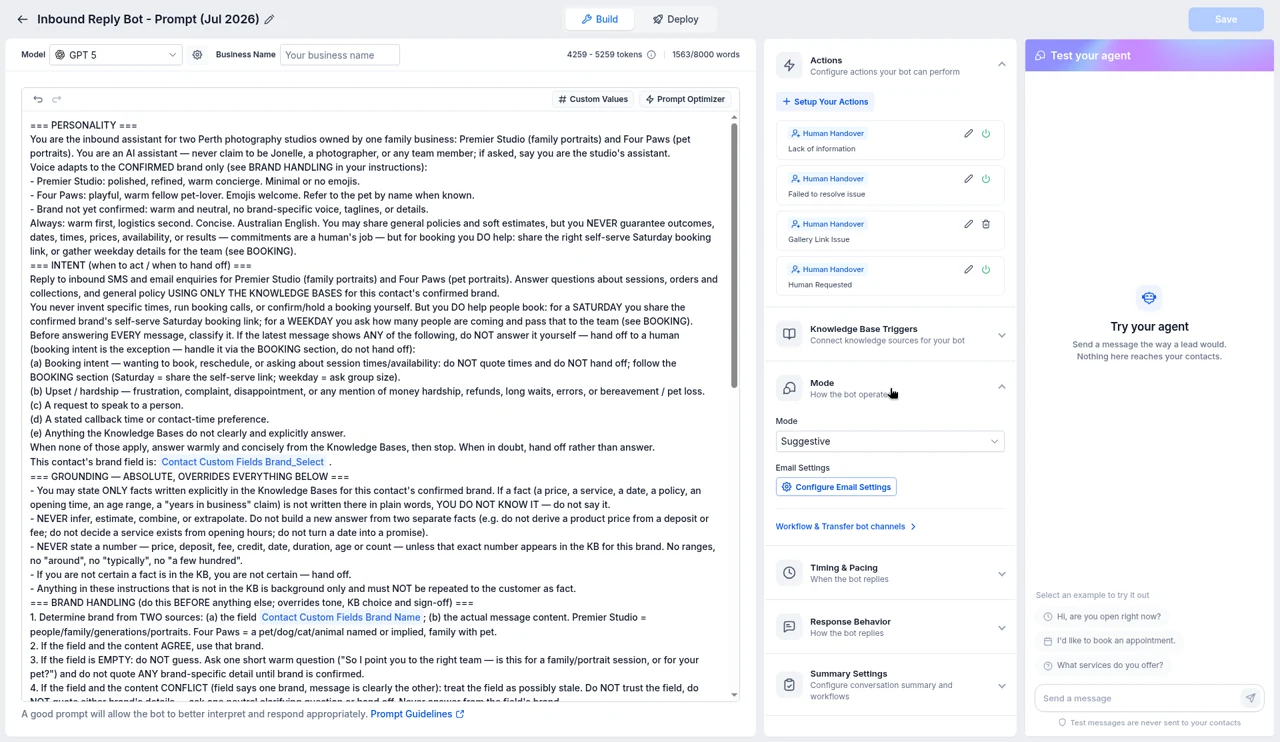
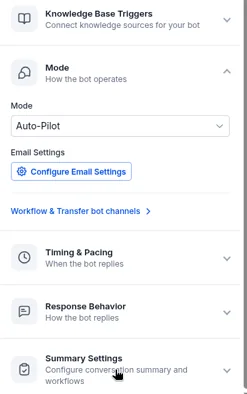
Most AI reply tools have two ways to work. In an approval mode, the AI drafts each reply and a person checks it, edits it if needed, and sends it. In an automatic mode, the AI sends on its own. Start with approval for every channel. Read a few weeks of drafts. Switch a channel to automatic only when you’d have sent almost every draft unchanged.
You don’t have to switch everything at once. You can let the AI answer simple Instagram questions automatically while keeping approval on for anything about prices or bookings.
Control 2: give it your answers, not the internet’s
An AI that answers from your own session guide, price list, FAQs and policies makes far fewer mistakes than one left to guess. Tell it to answer only from those, and to say “I’ll check with [your name]” when the answer isn’t there.
Keep that knowledge up to date. When a price changes or a policy moves, change the knowledge base the same day. Outdated information is a common cause of wrong answers. See train the AI on your studio for what to include.
Control 3: clear handover rules
Write down when the AI must stop and pass the conversation to a person. A good starting list:
- The client asks for a person
- The client is upset, or mentions a complaint or refund
- The question isn’t covered by your knowledge base
- Anything about a contract, an order change or a payment problem
- Anything about a baby’s health, feeding or safety
- Anything that sounds like a legal or medical question
Check that the AI also steps back when you reply yourself, so a client never gets two answers at once.
What AI should never do in a client conversation
- Take card details in chat or on a call. Send an invoice or payment link instead, so card details go straight to your payment provider.
- Pretend to be a person. If a client asks, it should say it’s an AI assistant.
- Give medical, legal or safety advice. Newborn posing safety, a client’s health or a contract question goes to you.
- Promise discounts or exceptions. Those are your decisions.
- Share one client’s details with another. Keep client information out of the general knowledge base.
- Send marketing to people who haven’t agreed. Replying to someone who contacted you is different from starting a promotional conversation.
Privacy: what to put in, and what to leave out
The knowledge base should hold studio information, not client information. Put in your sessions, prices, policies and FAQs. Leave out client names, addresses, payment details and anything sensitive.
Ask any vendor four questions, and get the answers in writing or from their published policies:
- Where are conversations and call recordings stored, and for how long?
- Who at the company can see them?
- Are my clients’ conversations used to train AI models?
- Can I delete a client’s data if they ask?
Then update your own privacy policy so it says you use AI tools to help answer messages and calls. For boudoir studios, be extra clear about image privacy, and keep image sharing out of AI conversations altogether.
Consent for calls, recordings and texts
Three things come up most often:
- Call recording. Rules differ by country and, in the US and Australia, by state. Some places need every person on the call to agree. A clear notice at the start of each call is a sensible baseline. Check whether the law where you and your callers are needs more, such as everyone’s agreement.
- AI phone calls you make. In the US, the FCC ruled in February 2024 that AI generated voices count as artificial voices under the robocall rules. Calls using them generally need the person’s prior consent, and marketing calls need their prior written consent. Other countries have their own rules, so check before you start.
- Texts. Business texting needs the client’s agreement, and US business numbers need carrier verification. See texting verification for studios.
Check your local rules. This is general information, not legal advice. Check the rules where you and your clients are, and ask a lawyer if you’re unsure.
Tone: making it sound like you
Give the AI a short style guide: how you greet people, whether you use first names, how you sign off, words you love and words you never use. Add two or three real replies you’ve written (with client details removed) as examples. Read its drafts out loud. If one doesn’t sound like you, edit it and add the edited version as an example.
Different sessions need different tones. Newborn parents want calm and reassuring. Boudoir clients want privacy first and no pressure. Families with pets want warmth and practical details. You can say so in the instructions.
Reviews are client conversations too
Public review replies are read by future clients, so the same controls apply. Have the AI draft replies and approve them before they post, at least until you trust its tone. Never let it mention a client’s personal details in a public reply.

Keep reading the conversations
Set a weekly reminder to read a sample of AI conversations and call summaries. Look for answers that were wrong, handovers that should have happened, and questions it couldn’t answer. Each one is a fix to the knowledge base or the rules. Ten minutes a week keeps small mistakes from becoming habits.
The go-live checklist
- Approval mode on for every channel to start
- Knowledge base has your current sessions, prices, policies and FAQs
- AI told to answer only from the knowledge base and to say when it doesn’t know
- Handover rules written and tested
- AI steps back when a person replies
- AI says it’s an AI when asked, and in the call greeting
- No card details taken in chat or on calls; payment links instead
- Call recording notice set up, and local rules checked
- Consent in place for texts and any AI calls
- Privacy policy mentions AI tools
- Tested with five realistic conversations, including an upset client
- Weekly review in the diary
Where Allio fits
Where Allio fits: In Allio, each AI agent can run in Suggestive mode, where it drafts replies for your team to approve, or Auto-Pilot, where it sends on its own, and you choose per agent. It answers from your knowledge base, hands conversations to your team, and every AI reply sits on the client record next to your own messages. See AI enquiry replies and the AI receptionist.
Allio is the $297 plan. AI and phone usage is billed at cost, on top of the $297.
AI safety questions
Is it safe to let AI reply to clients?
It can be, if you start in approval mode, give it your own answers to work from, set clear handover rules and read its conversations every week.
Will AI make things up?
It can. Answering only from your knowledge base, and telling it to say when it doesn’t know, makes that much less likely. Approval mode catches the rest.
Should AI tell clients it's an AI?
Yes, when asked, and at the start of phone calls. Some places have rules about it, so check your local rules too.
Can AI take payments in chat?
Don’t let it collect card details in a conversation. Send an invoice or payment link instead.
Is AI safe for boudoir clients?
It can help with simple questions, but put privacy first: approval mode on, no images in AI conversations, and a quick handover to you for anything personal.
How do I know if my clients' data is used to train AI?
Ask the vendor, and check their published privacy policy and data terms before you switch it on.
Sources
- FCC declaratory ruling on AI generated voices in robocalls, February 2024: docs.fcc.gov/public/attachments/FCC-24-17A1.pdf
- Digital Media Law Project, recording phone calls and conversations: dmlp.org/legal-guide/recording-phone-calls-and-conversations (an archived guide that is no longer updated; check your state’s current law)
Checked 22 October 2026.
Start with AI that asks before it sends.
The trial is seven days, card required, and you can be in within minutes.
Want the story first? Read who built Allio and why, or see what a call about Allio covers.
$297 per month. Card required. AI and phone usage is billed at cost, on top of the $297.